
Repair steps from a photo
An AI mechanic that shows you the fix
Mechy is an AI mechanic for people doing the repair themselves, on a car, a pickup, a skid steer or an excavator. Snap it, say what it's doing, and you get numbered steps with a moving drawing for each one, plus the tools, parts and safety checks. It doesn't plug into your car or read its computer.
 Ready
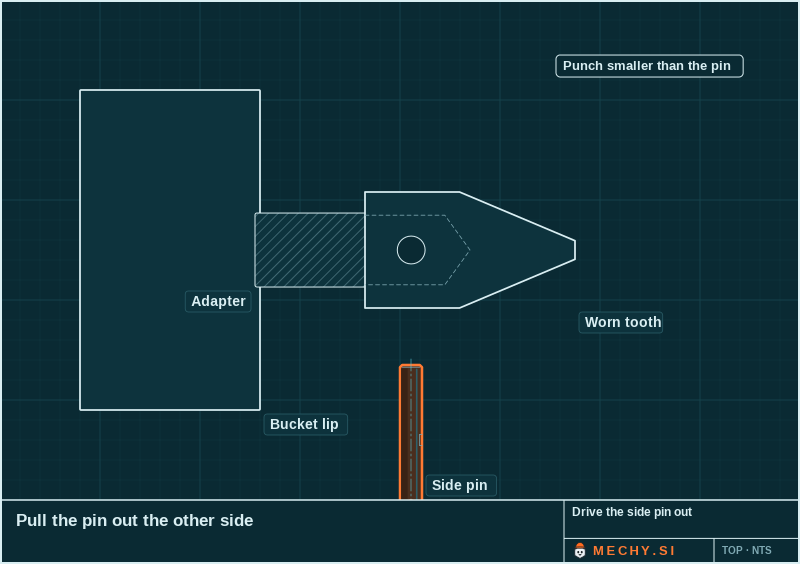
Step 2 of 6
Drive the side pin out
Put a pin punch on the end of the pin and drive it straight through with a hand sledge. Pull it out the far side.
How it works
Snap. Say. Follow.
- 1
Snap
A photo of the machine, the part or the display. Two or three angles help.
- 2
Say
Hold to talk: "Change the teeth on this bucket" or "This screw is stripped". Or type it.
- 3
Follow
Numbered steps with a moving drawing each, read aloud when your hands are busy.
A real guide
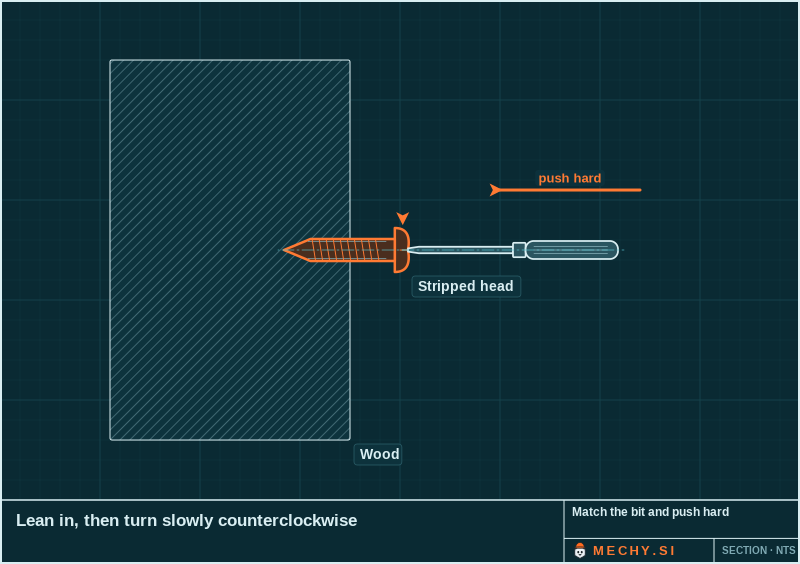
How to Remove a Stripped Screw
Try these in order and stop at the first one that works: a bit that fills the recess, a rubber band, a tapped-in bit, locking pliers on the head, and finally a screw extractor. Each step costs a little more damage than the one before.
- Use the right bit and push hard
- Put a rubber band in the recess
- Tap the bit in for grip
- Grip the head with locking pliers
- Use a screw extractor
- Fit a new screw
What Mechy does and what it doesn't
| Topic | Mechy |
|---|---|
| What you give it | You send up to 6 photos and a sentence or a voice note. A typed description works without a photo. |
| What you get | You get the safety steps first, then the tools and parts, then the job broken into steps, each one drawn and animated. |
| OBD2 and warning lights | Mechy doesn't plug into the port, read the car's computer or clear a light. Type the code a scanner gave you, or snap its screen, and you get the steps for the fix. |
| Ready-made car guides | There's one so far, a RAV4 cabin air filter. Every other car job is built by AI from your photos and what you tell it. |
| Torque, pressure and capacities | Mechy marks these to check against your manual, and the maker's manual always wins. |
| What it refuses | Mechy won't help bypass a safety device, run a machine without working brakes or delete emissions equipment. |
| Where it runs | It runs on iPhone, Android and the web, in English. |
| Guides | Your first needs no account, an account makes 3 a month, and Pro up to 100 a month. |
The last 52 guides were ready in 17 seconds at the median; the slowest took 49 (Oct 25 to Nov 8).
What is an AI mechanic?
An AI mechanic is an app you tell about a broken machine, and it tells you what to do next. Some read the car's computer through a plug-in adapter, some answer questions in a chat, and Mechy builds the repair as steps you can follow with a wrench in your hand.
None of them can put a hand on the machine or test a part, so treat the answer as a place to start. Use Mechy when you are about to do the job yourself and want the tools, the parts and each step drawn out, as in our free repair guides. Use a scanner to read a check engine light out of the port. Warranty work and complex electrical faults belong with your dealer.
How is Mechy different from car diagnostic apps?
The car apps here are built around codes and questions, and they are the right tool when you want to know what a warning light means. Mechy is built around doing the repair, and it also works on machines with no OBD2 port.
| Compare | Mechy | MECH AI | FIXD | Carmy AI | Wrenchit |
|---|---|---|---|---|---|
| Reads codes from the car | No. Type the code or snap the scanner | Yes, with an ELM327 adapter in its apps | Yes, with its own plug-in scanner, and can clear them | No. Paste the code | No. Paste the code |
| You start with | Up to 6 photos and a sentence | A question, a code or a photo | The scanner under the dash | Symptoms, a code, photos or a short video | A question, plus your service records |
| You get back | Numbered steps with a moving drawing each | Likely causes, repair guides, recalls, wiring diagrams | What the code means and how serious it is | Likely causes, costs, numbered steps with torque specs | Replies and suggested checks that use your records |
| Built for | Heavy equipment, cars, small engines, home repairs | Cars and trucks | US gas and hybrid cars from 1996, diesels from 2008 | Cars | Any car, by its own description |
We make Mechy, so read this with that in mind. The rows for MECH AI, FIXD, Carmy AI and Wrenchit come from their own sites, read November 7 to 10, 2026. They change, so check before you buy.
In every guide
Everything for the job, in the order you need it
Safety first
Lockout, blocking, power off, hot oil: before step 1, with a clear list of when to stop and call a pro.
Tools you have, tools you need
Mechy ticks the tools it can see in your photos, so you only fetch what's missing. With sizes: 19 mm, #2 Phillips.
Parts to buy by
Specs you can order with: "M8 × 1.25 × 25 mm, grade 8.8". Anything read from a photo is flagged to check.
A drawing that moves
Each step is a CAD-style drawing: the bolt turns out, the pin slides, the arrow shows which way.
Read aloud
Every step can be read out, and you can hold to talk instead of typing.
Specs flagged
Torque, pressure and capacities come marked "check your manual", never as gospel.
Mechy, a chatbot, a forum or the dealer?
Each has its place. Mechy is for the jobs you can do yourself with the right steps. Looking at another AI mechanic app? See Mechy vs MECH AI, or Mechy vs FIXD for a plug-in scanner.
| Compare | Mechy | General chatbot | Forums | Dealer |
|---|---|---|---|---|
| Sees your machine | Yes, from your photos | Some can read a photo | You describe it | In person |
| Reads your car's computer | No. Type in the code | No | No | Yes, with a scan tool |
| Answer | Numbered steps with a drawing each | Text you turn into steps | Threads that may match | They fix it |
| Tools and parts | Listed, with sizes to check | If you ask | Varies | On the invoice |
| Safety | First, with stop-and-call rules | Varies | Varies | Their job |
| Cost | Pro $79/year, or 3 guides a month with an account | Free or a subscription | Free | Service call and labor |
Free tools
Not sure what you're holding?
Pricing
Pay when it earns its keep.
No weekly plans, no trial that turns into a charge. Cancel on the web in two clicks.
Questions
Can AI really diagnose my machine?
It can narrow it down, but it can't test a part or take a measurement. From your photos and what you tell it, Mechy lays out the fixes in the order a mechanic would try them. For an engine that won't start, that's usually the battery, the terminals, then the starter. For a Bobcat that shuts down with code E001076-16, it's the fuel supply first. For warranty work, complex electrical faults and anything the guide marks as specialist, use your dealer.
Is Mechy free?
Your first 3 guides are on us, and the first needs no account. Pro makes up to 100 a month, for $79 a year ($6.58 a month) or $9.99 monthly.
Which machines does it know?
Heavy equipment such as skid steers, compact track loaders, excavators, loaders and haul trucks, and the everyday jobs around the house (see the AI handyman). Cars and pickups work from your photos too; the one ready-made car guide so far is the RAV4 cabin air filter. From your photo it picks out the make and model when it can, and tells you when it is unsure.
Does Mechy read OBD2 codes or check engine lights?
No. Mechy has no connection to the car, so it can't pull codes from its computer or clear a warning light. If a scanner already gave you a code, snap the screen or type it in, and you'll get the steps for that fix.
Can AI replace a real mechanic?
No. It can only work from your photos and your words, and it doesn't replace the maker's manual or your training. It helps when the job is one you can do yourself with the right steps, and it tells you when to stop and call a pro.
Is it safe to follow?
Every guide starts with the safety steps for the job (lockout, blocking, power off, hot oil) and lists when to stop and call a pro or the dealer. Torque values and other specs are flagged to check against your manual. Mechy is a guide, not a replacement for the maker's manual or your training. See how safety works in a guide.
Does it work hands-free?
Each step can be read aloud, and you can hold to talk instead of typing, so you can keep your gloves on.
On your phone, or right here in the browser
The web app works on any phone today: open it, allow the camera, go. Or get the iPhone or Android app.